Astro review: better than Next.js?

What is Astro?
Astro is a JavaScript web framework (yes another one). But, this one is langugage agnostic, which means you can use a variety of UI frameworks, to name them: React, Vue, Preact, Svelte and Solid. Pretty “solid” lineup of frameworks there. But there are other language agnostic web frameworks out there, so what sets Astro apart? The big one: Astro ships zero-JS code if you just use pure Astro components + Markdown/MDX files.
I learned about Astro in the middle of adding to my Next.Js blog, aptly named: Bob with a Blog. The website was enamored with a Supabase Auth system + database, GitHub Actions CI/CD pipeline pushing to AWS ECS, an admin dashboard with Google Analytics data and full content-management system (CMS). But in all its glory, the reality was I wasn’t using the blog a whole lot. And it was costing me a ton in AWS:
- $50.40 ($31.40 of which came from ECS) the first month,
- $52.33 ($42.38 of which came from ECS) the next month,
- $13.15 the third month, …and $8.81 the last month before I stopped the service. Tech-wise, it was, in my opinion, one of the most impressive personal projects I built to date. But I wanted a blog website that was inherently about the content of the articles, and not about how many automated-resume-scanners I could pass. So I switched to Astro! First, let’s explore about the real-world, quantitative differences between Astro and Next.js.
Astro’s pros
Bundle size differences
Let’s “weigh” the difference between the 2 blog websites, starting with my old Next.js one:
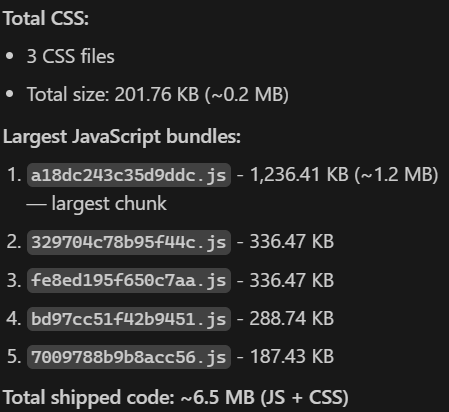
~6.5MB was the total size shipped. Which is apparently a lot for a blog website with one article according to ChatGPT. Who knows what is in the largest JavaScript bundle, Next.JS serializes/randomizes the bundle names so we have no clue as to who is the culprit of being the largest chunk of JS.
Now let’s check out our Astro blog:
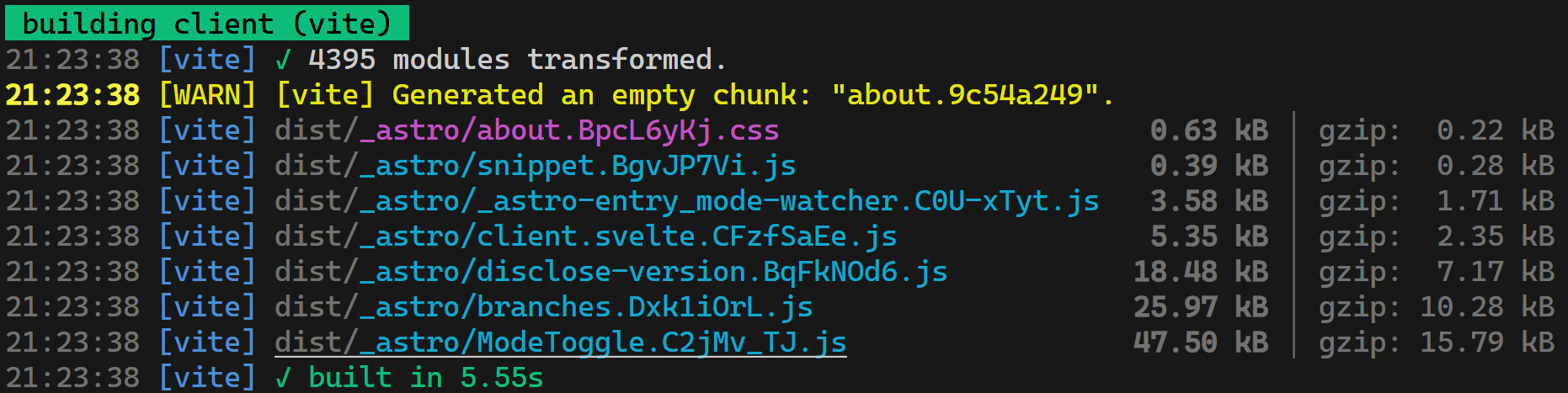 ~101 KB total size shipped. Which is a 98.45% decrease in size compared to Bob with a Blog! And look, we can actually see what is taking up the most size. Without the ModeToggle Svelte component, the app would be about half the size. But what does that mean for real-world users?
Load-time performance
To be honest… the difference is noticeable. Check out the Next.js blog here and the Astro blog here (you are probably already on this one!) if you want to check out the difference in performance for yourself.
Here is the performance audit results from Google Chrome’s Lighthouse audit on the Bob with a Blog website:
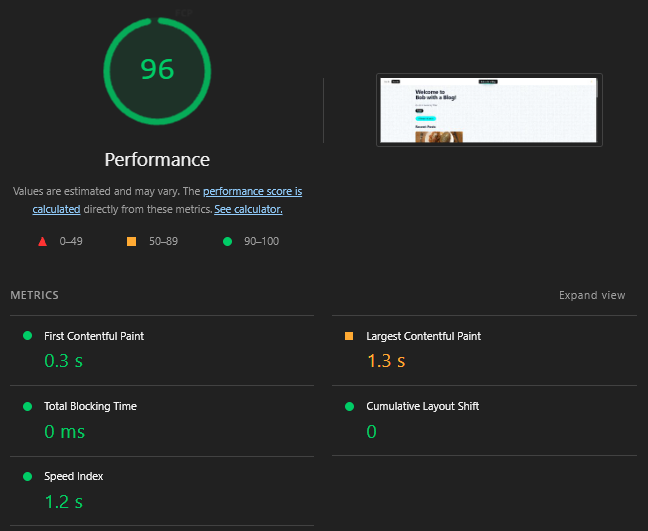 Not bad… and here is the Astro audit results:
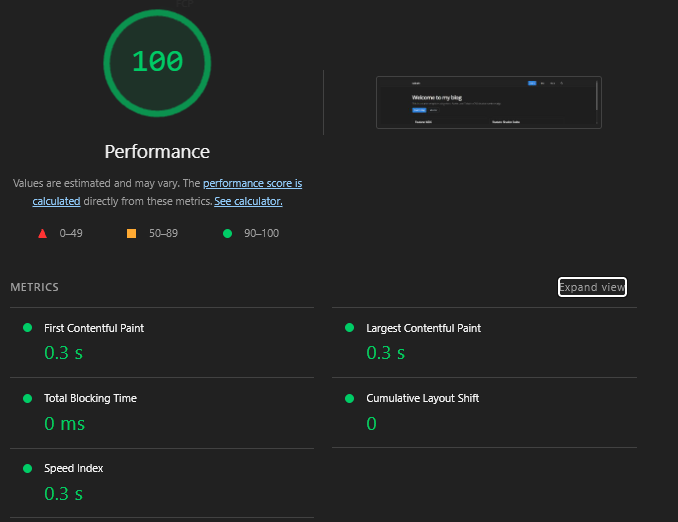
It’s a lot better! Saving a second in Largest Contentful Paint speed and Speed Index doesn’t seem like a lot, but it is definitely noticeable when you start clicking around both websites.
I want to acknowledge that this isn’t a fair, 1:1 comparison, as Bob with a Blog rendered articles that had their content stored in a Supabase database, while the Astro blog renders from statically stored .mdx files. Fetching data from a database vs. having that data on the server are inherently different processes. What I really want to highlight is the difference in methodologies between the two products, as well as the developer experience in both frameworks.
The Developer Experience
When I started working on Bob with a Blog, it was hard to compare the developer experience (DX) with any other modern web frameworks because my experience was so limited. During the summer I made Bob with a Blog, I was also doing a internship where we made full-stack internal applications using ASP .NET, pulling data from database tables older than I was. So React, at the time, felt a lot better because it wasn’t as sloppy and old as ASP .NET, though I do have a lot of respect for ASP .NET and it is probably my #2 most used framework (against my will).
After the internship, I found work as a Junior Frontend Developer. The company mainly used Svelte, which I never heard of before. Svelte is a lovely UI framework, which simplifies a lot in comparison to React. One of the things people love about Svelte is the DX, code is a lot more readable… no more virtual DOMs to struggle with, no hooks to memorize, no dependency arrays… Svelte is awesome. So combining Svelte and Astro was a pretty easy decision when I decided to update the blog.
Let’s take a look at the difference between the pages that show the list of blog articles for each website. First let’s start with the React blog page layout:
/src/app/page.tsx:
import { getBlogPosts } from "@/data/blog";
import { type Article } from "@/data/blog-client";
import { Header } from "@/components/shared/Header";
import Footer from "@/components/shared/Footer";
import { UnauthorizedToast } from "@/components/shared/UnauthorizedToast";
import { ClientSections } from "@/components/home/ClientSections";

export default async function BlogPage() {
    let posts: Article[] = [];
    try {
        posts = await getBlogPosts();
    } catch (error) {
        console.error("Error fetching posts:", error);
        posts = [];
    }

    // Get all unique tags for filtering
    const allTags = Array.from(
        new Set(posts.flatMap((post) => post.tags || []))
    ).sort();

    return (
        <div className="flex flex-col h-screen">
            <Header scrollProgress={false} />
            <UnauthorizedToast />

            <ClientSections posts={posts} allTags={allTags} />

            <Footer />
        </div>
    );
}
And for the Astro one:
/src/pages/blog/index.astro:
---
import Layout from '../../layouts/Layout.astro';
import { getCollection } from 'astro:content';
import * as Card from '$lib/components/ui/card';
import { Button } from '$lib/components/ui/button';

const posts = (await getCollection('blog')).sort(
	(a, b) => b.data.pubDate.valueOf() - a.data.pubDate.valueOf()
);
---

<Layout title="Blog">
	<div class="space-y-6">
		<div class="flex flex-col gap-2">
			<h1 class="text-3xl font-bold tracking-tight">Blog</h1>
			<p class="text-muted-foreground">
				Thoughts, tutorials, and insights.
			</p>
		</div>

		<div class="grid gap-6 md:grid-cols-2 lg:grid-cols-3">
			{posts.map((post) => (
				<Card.Root class="flex flex-col justify-between">
					<Card.Header>
						<Card.Title class="line-clamp-2">
							<a href={`/blog/${post.id}/`} class="hover:underline">
								{post.data.title}
							</a>
						</Card.Title>
						<Card.Description>
							{post.data.pubDate.toLocaleDateString('en-us', {
								year: 'numeric',
								month: 'short',
								day: 'numeric',
							})}
						</Card.Description>
					</Card.Header>
					<Card.Content>
						<p class="line-clamp-3 text-sm text-muted-foreground">
							{post.data.description}
						</p>
					</Card.Content>
					<Card.Footer>
						<Button href={`/blog/${post.id}/`} variant="secondary" class="w-full">
							Read Article
						</Button>
					</Card.Footer>
				</Card.Root>
			))}
		</div>
	</div>
</Layout>
As a developer, I like the Astro version a lot better. Yes, it has more lines of code (I could probably optimize this by making a specific BlogCard.svelte component), but it is, in my opinion WAY more understandable. The Layout Astro component defines a web page, that’s easy to understand from this code. You’d have to infer that the Next.js page is a page based of it’s location (/src/app/page.tsx defines a Next.js page layout/template), which would require previously-learned Next.js knowledge.
The Layout Astro component isn’t hard to understand either:
/src/layouts/Layout.astro:
---
import Header from '../components/Header.astro';
import '../styles/global.css';
import '@fontsource/open-sans';
import '@fontsource/cascadia-code';
import '@fontsource/eb-garamond';
import { ModeWatcher } from "mode-watcher";

interface Props {
	title: string;
	description?: string;
}

const { title, description = "A personal blog" } = Astro.props;
---

<!doctype html>
<html lang="en">
	<head>
		<meta charset="UTF-8" />
		<meta name="description" content={description} />
		<meta name="viewport" content="width=device-width" />
		<link rel="icon" type="image/svg+xml" href="/favicon.svg" />
		<meta name="generator" content={Astro.generator} />
		<title>{title}</title>
	</head>
	<body class="min-h-screen bg-background font-sans antialiased">
		<ModeWatcher client:load />
		<Header />
		<main class="container py-6">
			<slot />
		</main>
	</body>
</html>
Super easy to understand. Astro gives you explicit simplicity with what it’s doing, and Next.js abstracts away a lot of the implementation but requires “Next.js knowledge”. This is not to say that Next.js is a completely useless web framework because you have to learn about it before using it, but I like Astro from a methodology standpoint as it is more Svelte/Arch-like.
Astro’s downsides
Astro isn’t all sunshine and rainbows though. While you won’t wake up one day to find that your kernel was corrupted much like in Arch Linux, you won’t have as smooth as an experience as with Next.js. So what does Astro get wrong?
Slow dev server
The dev server was easy to pick out as a point of contention surrounding Astro. While the server will automatically refresh when changes are made (this is called Hot Module Replacement, or HMR), that refresh takes a while to do. Just while writing this first post and seeing the content change, it takes a while, anywhere from a minimum of 2 seconds to ~11 seconds:
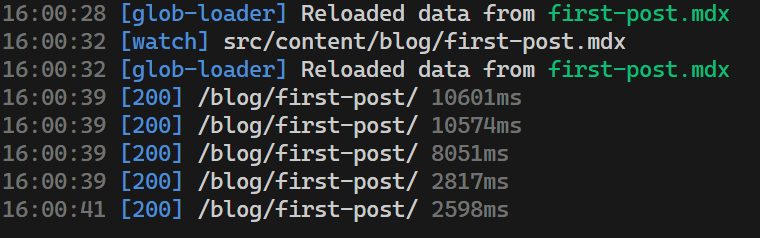 The ~11 seconds came from me editing before the server could load the page completely, so it could be more or less depending on how fast you are editing. Still, this is one area where Next.js is better. Next.js has fine-grained HMR, which will swap out edited code at the module level, so it doesn’t need to load the whole page each time like Astro does.
It’s also pretty slow loading routes, this is how long it took to go from each route in my blog:
 Just under 2.5 seconds to load each page. Next.js uses Turbopack as its’ bundler, which is super quick, while Astro just uses Vite’s… which gets the job done but noticeably slower compared to Turbopack.
This is probably my biggest sticking point with Astro… the dev server just is too slow. But this is a tradeoff when you go full Arch-mode with a web framework; it’s slim, but you don’t have certain tools that speed processes up like Turbopack does with Next.js.
Harder to go “full-stack”
Astro was built for making content-driven, server-first websites. If you are building a website that has more than that, other frameworks would probably be better. For example, Next.js inherently provides you:
- Routing
- API routes
- Middleware
- Auth patterns
- Cookies, headers, edge functions
- Streaming
- Caching
- Data revalidation Which is great for making SaaS apps! But not for static blog websites. So if I were to try and add, let’s say, an admin dashboard to my Astro website… it would be really difficult in comparison to Next.js.
Summary
If Next.js is the Windows 11 of web frameworks, Astro is Arch Linux.
Astro isn’t going to replace any big-name web frameworks like Next.js anytime soon. Instead, it serves a purpose which it does well: making performant, low-JS, content-driven websites. Outside of using it for simple websites like portfolios or, in this case a blog, Astro falls short. Personally, it was fun to shave off 99% of the code from my blog website and transform it into something where I can truly say I know what 100% of the codebase does. The combination of a simple framework like Astro and a simple UI framework like Svelte combines into an elegant, developer-first experience that is hard to find elsewhere.